Just liked to say that I really like Formspring 404 not found page, it’s really cool :P, see it below or try to navigate to any page that doesn’t exist.
I like also to mention this great article by Chris Coyier from CSS-Tricks that talks about 404 pages best practices. You should really read it.
Enjoy your day!
UPDATE 07/09/2011:
Keep yourself updated with brilliant 404 pages by following this blog.
Another article of our endless series that talks about accessing URL shortening services programmatically.
This article is talking about 1click.at shortening service, how you can use it, and how to access it via your C#/VB.NET application.
Introduction
We can’t say that 1click.atis not one of the well-known services nor it has anything special, however, as long as it provides an API we are very interested in it.
When you visit service website, http://1click.at, you can see that nothing easier from 1click.at, just push your long URL into the text box and click the shortening button.
API
1click.at provides you a very simple easy-to-use API. This API contains only one function that’s used for shortening URLs. Another good thing is that this function doesn’t require any kind of authentication for users. Therefore, you need just to send it your long URL (as you did with the website.)
action:
Yet, it can accept only one value, shorturl, which orders the function to shorten the specified url.
url:
The long URL to be shortened.
format:
The format of the returned data from the function. Can be simple, xml, or json.
As you know, the .NET BCL doesn’t support JSON (some third-party components do,) and thus, we won’t cover JSON data returned from the function. Rather, we’ll concentrate on plain and XML data returned.
When the format of this function is XML, the returned data, if the function succeeded, is like the following if this is your first time you shorten this URL:
Now, let’s do it in C# and VB.NET. Check the following function that tries to shorten long URLs via the id.gd API:
// C#

string Shorten(string url, bool xml)
{
    url = Uri.EscapeUriString(url);
    string reqUri =
String.Format("http://1click.at/api.php?action=shorturl&url={0}&format={1}",
        url, xml ? "xml" : "simple");

    HttpWebRequest req = (HttpWebRequest)WebRequest.Create(reqUri);
    req.Timeout = 10000; // 10 seconds

    // if the function fails and format==txt throws an exception
    Stream stm = req.GetResponse().GetResponseStream();

    if (xml)
    {
        XmlDocument doc = new XmlDocument();
        doc.Load(stm);

        // error checking for xml
        if (doc["result"]["statusCode"].InnerText != "200")
            throw new WebException(doc["result"]["statusCode"].InnerText);

        return doc["result"]["shorturl"].InnerText;
    }
    else // Text
        using (StreamReader reader = new StreamReader(stm))
            return reader.ReadLine();
}
' VB.NET

Private Function Shorten(url As String, xml As Boolean) As String
	url = Uri.EscapeUriString(url)
	Dim reqUri As String = "http://1click.at/api.php?action=shorturl&url={0}&format={1}"
	If (xml) Then
		reqUri = String.Format(reqUri, url, "xml")
	Else
		reqUri = String.Format(reqUri, url, "simple")
	End If

	Dim req As HttpWebRequest = DirectCast(WebRequest.Create(reqUri), HttpWebRequest)
	req.Timeout = 5000
	Dim stm As Stream = req.GetResponse().GetResponseStream()

	If xml Then
		Dim doc As New XmlDocument()
		doc.Load(stm)

		' error checking for xml
		If doc("result")("statusCode").InnerText <> "200" Then
			Throw New WebException(doc("result")("statusCode").InnerText)
		End If

		Return doc("result")("shorturl").InnerText
	Else
		' Simple
		Using reader As New StreamReader(stm)
			Return reader.ReadLine()
		End Using
	End If
End Function
Notice that we have used the function System.Net.Uri.EscapeUriString() to eliminate unacceptable characters from the URL by encoding them.
Notice too that we have included our code in a Try-Catch block so we can catch exceptions before they blow up our application.
What’s next
Consider reading other articles in this series here.
This is the last article in this series, it talks about unmanaged code interoperation; that’s, interop between .NET code and other code from other technologies (like Windows API, native libraries, COM, ActiveX, etc.)
Be prepared!
Introduction
Managed code interop wasn’t so interesting, so it’s the time for some fun. You might want to call some Win32 API functions, or it might be interesting if you make use of old, but useful, COM components. Let’s start!
Unmanaged Code Interop
Managed code interoperation isn’t so interesting, but this is. Unmanaged interoperation is not easy as the managed interop, and it’s also much difficult and much harder to implement. In unmanaged code interoperation, the first system is the .NET code; the other system might be any other technology including Win32 API, COM, ActiveX, etc. Simply, unmanaged interop can be seen in three major forms:
Interoperation with Native Libraries.
Interoperation with COM components.
Interoperation with ActiveX.
Interop with Native Libraries
This is the most famous form of .NET interop with unmanaged code. We usually call this technique, Platform Invocation, or simply PInvoke. Platform Invocation or PInvoke refers to the technique used to call functions of native unmanaged libraries such as the Windows API.
To PInvoke a function, you must declare it in your .NET code. That declaration is called the Managed Signature. To complete the managed signature, you need to know the following information about the function:
The library file which the function resides in.
Function name.
Return type of the function.
Input parameters.
Other relevant information such as encoding.
Here comes a question, how could we handle types in unmanaged code that aren’t available in .NET (e.g. BOOL, LPCTSTR, etc.)?
The solution is in Marshaling. Marshaling is the process of converting unmanaged types into managed and vice versa (see figure 1.) That conversion can be done in many ways based on the type to be converted. For example, BOOL can simply be converted to System.Boolean, and LPCTSTR can be converted to System.String, System.Text.StringBuilder, or even System.Char[]. Compound types (like structures and unions) are usually don’t have counterparts in .NET code and thus you need to create them manually. Read our book about marshaling here.
Figure 1 – The Marshaling Process
To understand P/Invoke very well, we’ll take an example. The following code switches between mouse button functions, making the right button acts as the primary key, while making the left button acts as the secondary key.
In this code, we’ll use the SwapMouseButtons() function of the Win32 API which resides in user32.dll library and has the following declaration:
BOOL SwapMouseButton(
    BOOL fSwap
    );
Of course, the first thing is to create the managed signature (the PInvoke method) of the function in .NET:
' VB.NET
Declare Auto Function SwapMouseButton Lib "user32.dll" _
    (ByVal fSwap As Boolean) As Boolean
Then we can call it:
// C#

public void MakeRightButtonPrimary()
{
    SwapMouseButton(true);
}

public void MakeLeftButtonPrimary()
{
    SwapMouseButton(false);
}
' VB.NET

Public Sub MakeRightButtonPrimary()
    SwapMouseButton(True)
End Sub

Public Sub MakeLeftButtonPrimary()
    SwapMouseButton(False)
End Sub
Interop with COM Components
The other form of unmanaged interoperation is the COM Interop. COM Interop is very large and much harder than P/Invoke and it has many ways to implement. For the sake of our discussion (this is just a sneak look at the technique,) we’ll take a very simple example.
COM Interop includes all COM-related technologies such as OLE, COM+, ActiveX, etc.
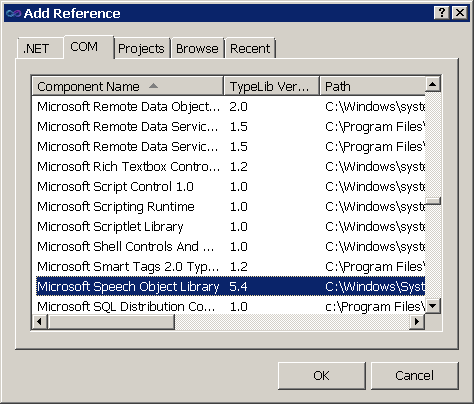
Of course, you can’t talk directly to unmanaged code. As you’ve seen in Platform Invocation, you have to declare your functions and types in your .NET code. How can you do this? Actually, Visual Studio helps you almost with everything so that you simply to include a COM-component in your .NET application, you go to the COM tab of the Add Reference dialog (figure 2) and select the COM component that you wish to add to your project, and you’re ready to use it!
Figure 2 – Adding Reference to SpeechLib Library
When you add a COM-component to your .NET application, Visual Studio automatically declares all functions and types in that library for you. How? It creates a Proxy library (i.e. assembly) that contains the managed signatures of the unmanaged types and functions of the COM component and adds it to your .NET application.
The proxy acts as an intermediary layer between your .NET assembly and the COM-component. Therefore, your code actually calls the managed signatures in the proxy library that forwards your calls to the COM-component and returns back the results.
Keep in mind that proxy libraries also called Primary Interop Assemblies (PIAs) and Runtime Callable Wrappers (RCWs.)
Best mentioning that Visual Studio 2010 (or technically, .NET 4.0) has lots of improved features for interop. For example, now you don’t have to ship a proxy/PIA/RCW assembly along with your executable since the information in this assembly can now be embedded into your executable; this is what called, Interop Type Embedding.
Of course, you can create your managed signatures manually, however, it’s not recommended especially if you don’t have enough knowledge of the underlying technology and the marshaling of functions and types (you know what’s being said about COM!)
As an example, we’ll create a simple application that reads user inputs and speaks it. Follow these steps:
Create a new Console application.
Add a reference to the Microsoft Speech Object Library (see figure 2.)
Write the following code and run your application:
// C#

using SpeechLib;

static void Main()
{
    Console.WriteLine("Enter the text to read:");
    string txt = Console.ReadLine();
    Speak(txt);
}

static void Speak(string text)
{
    SpVoice voice = new SpVoiceClass();
    voice.Speak(text, SpeechVoiceSpeakFlags.SVSFDefault);
}
' VB.NET

Imports SpeechLib

Sub Main()
    Console.WriteLine("Enter the text to read:")
    Dim txt As String = Console.ReadLine()
    Speak(txt)
End Sub

Sub Speak(ByVal text As String)
    Dim voice As New SpVoiceClass()
    voice.Speak(text, SpeechVoiceSpeakFlags.SVSFDefault)
End Sub
If you are using Visual Studio 2010 and .NET 4.0 and the application failed to run because of Interop problems, try disabling Interop Type Embedding feature from the properties on the reference SpeechLib.dll.
Interop with ActiveX Controls
ActiveX is no more than a COM component that has an interface. Therefore, nearly all what we have said about COM components in the last section can be applied here except the way we add ActiveX components to our .NET applications.
To add an ActiveX control to your .NET application, you can right-click the Toolbox, select Choose Toolbox Items, switch to the COM Components tab and select the controls that you wish to use in your application (see figure 3.)
Figure 3 – Adding WMP Control to the Toolbox
Another way is to use the aximp.exe tool provided by the .NET Framework (located in Program FilesMicrosoft SDKsWindowsv7.0Abin) to create the proxy assembly for the ActiveX component:
aximp.exe "C:WindowsSystem32wmp.dll"
Not surprisingly, you can create the proxy using the way for COM components discussed in the previous section, however, you won’t see any control that can be added to your form! That way creates control class wrappers for unmanaged ActiveX controls in that component.
Summary
So, unmanaged code interoperation comes in two forms: 1) PInvoke: interop with native libraries including the Windows API 2) COM-interop which includes all COM-related technologies like COM+, OLE, and ActiveX.
To PInvoke a method, you must declare it in your .NET code. The declaration must include 1) the library which the function resides in 2) the return type of the function 3) function arguments.
COM-interop also need function and type declaration and that’s usually done for you by the Visual Studio which creates a proxy (also called RCW and PIA) assembly that contains managed definitions of the unmanaged functions and types and adds it to your project.
In the previous article, you learnt what interoperability is and how it relates to the .NET Framework. In this article, we’re going to talk about the first form of interoperability, the Managed Code Interop. In the next article, we’ll talk about the other forms.
Introduction
So, to understand Interoperation well in the .NET Framework, you must see it in action. In this article, we’ll talk about the first form of .NET interoperability and see how to implement it using the available tools.
Just a reminder, Interoperability is the process of communication between two separate systems. In .NET Interop, the first system is always the .NET Framework; the other system might be any other technology.
Forms of Interop
Interoperability in .NET Framework has two forms:
Managed Code Interoperability
Unmanaged Code Interoperability
Next, we have a short discussion of each of the forms.
Managed Code Interop
This was one of the main goals of .NET Framework. Managed Code Interoperability means that you can easily communicate with any other .NET assembly no matter what language used to build that assembly.
Not surprisingly, because of the nature of .NET Framework and its runtime engine (the CLR,) .NET code supposed to be called Managed Code, while any other code is unmanaged.
To see this in action, let’s try this:
Create a new Console application in the language you like (C#/VB.NET.)
Add a new Class Library project to the solution and choose another language other than the one used in the first project.
In the Class Library project, add the following code (choose the suitable project):
// C#

public static class Hello
{
    public static string SayHello(string name)
    {
        return "Hello, " + name;
    }
}
' VB.NET

Public Module Hello
    Public Function SayHello(ByVal name As String) As String
        Return "Hello, " & name
    End Function
End Module
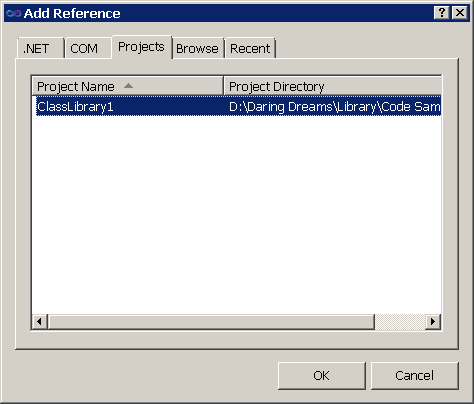
Now, go back to the Console application. Our goal is to call the function we have added to the other project. To do this, you must first add a reference to the library in the first project. Right-click the Console project in Solution Explorer and choose Add Reference to open the Add Reference dialog (figure 1.) Go to the Projects tab and select the class library project to add it.
Figure 1 - Add Reference to a friend project
Now you can add the following code to the Console application to call the SayHello() function of the class library.
' VB.NET

Sub Main()
    Console.WriteLine(ClassLibrary1.Hello.SayHello("Mohammad Elsheimy"))
End Sub
How this happened? How could we use the VB.NET module in C# which is not available there (or the C#’s static class in VB which is not available there too)?
Not just that, but you can inherit C# classes from VB.NET (and vice versa) and do all you like as if both were created using the same language. The secret behind this is the Common Intermediate Language (CIL.)
When you compile your project, the compiler actually doesn’t convert your C#/VB.NET code to instructions in the Machine language. Rather, it converts your code to another language of the .NET Framework, which is the Common Intermediate Language. The Common Intermediate Language, or simply CIL, is the main language of .NET Framework which inherits all the functionalities of the framework, and which all other .NET languages when compiled are converted to it.
So, the CIL fits as a middle layer between your .NET language and the machine language. When you compile your project, the compiler converts your code to CIL statements and emits them in assembly file. In runtime, the compiler reads the CIL from the assembly and converts them to machine-readable statements.
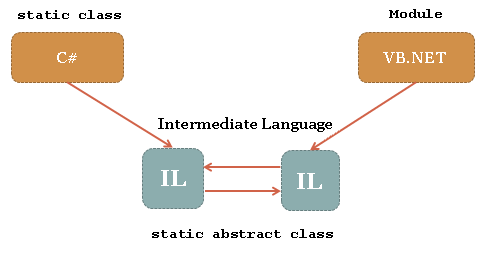
How CIL helps in interoperation? The communication between .NET assemblies is now done through the CIL of the assemblies. Therefore, you don’t need to be aware of structures and statements that are not available in your language since every statement for any .NET language has a counterpart in IL. For example, both the C# static class and VB.NET module convert to CIL static abstract class (see figure 2.)
Figure 2 - CIL and other .NET languages
Managed Interop is not restricted to C# and VB.NET only; it’s about all languages run inside the CLR (i.e. based on .NET Framework.)
If we have a sneak look at the CIL generated from the Hello class which is nearly the same from both VB.NET and C#, we would see the following code:
.class public abstract auto ansi sealed beforefieldinit ClassLibrary1.Hello
       extends [mscorlib]System.Object
{

    .method public hidebysig static string  SayHello(string name) cil managed
    {
      // Code size       12 (0xc)
      .maxstack  8
      IL_0000:  ldstr      "Hello, "
      IL_0005:  ldarg.0
      IL_0006:  call       string [mscorlib]System.String::Concat(string,
                                                              string)
      IL_000b:  ret
    } // end of method Hello::SayHello

} // end of class ClassLibrary1.Hello
On the other hand, this is the code generated from the Main function (which is also the same from VB.NET/C#):
.class public abstract auto ansi sealed beforefieldinit ConsoleApplication1.Program
       extends [mscorlib]System.Object
{

    .method private hidebysig static void  Main() cil managed
    {
      .entrypoint
      .maxstack  8
      IL_0000:  ldstr      "Mohammad Elsheimy"
      IL_0005:  call       string [ClassLibrary1]ClassLibrary1.Hello::SayHello(string)
      IL_000a:  call       void [mscorlib]System.Console::WriteLine(string)
      IL_000f:  ret
    } // end of method Program::Main

} // end of class ConsoleApplication1.Program
You can use the ILDasm.exe tool to get the CIL code of an assembly. This tool is located in Program FilesMicrosoft SDKsWindows<version>bin.
Here comes a question, is there CIL developers? Could we write the CIL directly and build it into .NET assembly? Why we can’t find much (if not any) CIL developers? You can extract the answer from the CIL code itself. As you see, CIL is not so friendly and its statements are not so clear. Plus, if we could use common languages to generate the CIL, we we’d like to program in CIL directly? So it’s better to leave the CIL for the compiler.
Now, let’s see the other form of .NET interoperation, Unmanaged Code Interoperability.
Summary
So, the secret of Managed Code Interoperation falls in the Common Intermediate Language or CIL. When you compile your code, the compiler converts your C#/VB.NET (or any other .NET language) to CIL instructions and saves them in the assembly, and that’s the secret. The linking between .NET assemblies of different languages relies on the fact that the linking is actually done between CILs of the assemblies. The assembly code doesn’t (usually) have any clue about the language used to develop it. In the runtime, the compiler reads those instructions and converts them to machine instructions and execute them.
Next, we’ll talk about the other form of .NET Interoperation, it’s the interoperation with unmanaged code.
In this article and the few following it, we’ll try to take a tour in Interoperability in .NET Framework.
In this lesson, we’ll start by an introduction to the concept of Interoperability. In the next few lessons, we’ll have a look at Interoperability and how it fits into the .NET Framework and other technologies.
Since Interoperability is a very huge topic and cannot be covered in just a few articles, we’ll concentrate on Interoperability in .NET Framework (not any other technologies) and summarize its uses.
Here we go!
Introduction
Let’s get hands on the concept of Interoperability and it’s relation to the .NET Framework.
Concept
Interoperability (reduced to Interop) is the ability of two diverse systems or different systems to communicate (i.e. inter-operate) with each other. When I say ‘two systems’ I assume that the first one is always the .NET Framework, since we are interested in .NET and also the interoperability is a very huge topic and cannot be summarized in just a few articles. The other system might be any other software, component, or service based on any technology other than the .NET Framework. For example, we could interoperate with Win32 API, MFC applications, COM/ActiveX components, and so on.
So we have two different systems, the first is the .NET Framework, while the other is any other technology. Our goal is to communicate with that stranger; that’s the main goal of Interoperability in .NET Framework.
Goals and Benefits
Here comes a question (or a few questions!), why do I need interoperation? Why I do need to communicate with other systems at all? If I need specific features, couldn’t I just use existing functionalities of .NET Framework to accomplish my tasks? I can even redevelop them!
We can summarize the answer of those questions in a few points:
First, in many cases, you can’t redevelop those components because the functionalities they offer is either very difficult (sometimes impossible) or maybe you don’t sufficient knowledge to redevelop them! Unless if you are very brilliant and have enough knowledge of the Assembly language, you can develop your API that would replace current system API, and then you’ll have also to interoperate with your API to be able to call it from your .NET Framework application.
If you’re not convinced yet, this is should be for you. You might be not having enough time to redevelop the component that may take a very long time and effort to complete. Imagine how much time would take to code, debug, and test your component. Plus, you can rely on existing components and trust them, many bugs can appear in your code from time to time and you’ll have to fix them all!
Other 3rd party component might not exist, or maybe the company you work for require you to use such those components.
You don’t need to reinvent the wheel, do you?
So, including Interop code in your .NET projects is sometimes inevitable (especially when working with Windows API) that you definitely can’t keep yourself away from them.
Summary
So you have now basic understanding of what Interoperability means. As a reminder, Interoperability is the process of two diverse systems communicate with each other. For us, the first system is the .NET Framework. The other system is any other technology (Windows API, MFC, COM/ActiveX, etc.)
You can’t live without Interop, actually you did some interoperation in your work (you may be actually do that every day.)
Now you are ready to take a look at how Interop fits in .NET Framework.
In a heavily loaded computer system, a steady stream of high-priority processes can prevent a low-priority process from ever getting resources. Generally, one of two things will happen. Either the process will eventually be run (at 2 A.M. Sunday, when the system is finally lightly loaded), or the computer system will eventually crash and lose all unfinished low-priority processes…. Rumor has it that, when they shut down the IBM 7094 at MIT in 1973, they found a low-priority process that had been submitted in 1967 and had not yet been run.
Silbershatz and Galvin, Operating System Concepts, 5.3.3 Priority Scheduling
If you are a Microsoft fan or you love to follow updates about Microsoft or Microsoft technologies, then this is for you. We have gathered all official Microsoft twitter accounts in only one twitter list!
This is another article of our URL shortening services series. This article is talking about X.co shortening service provided by Go Daddy. If you don’t know how to access this service from your .NET application, then it’s the time to.
We’ll have a complete discussion of the WCF services offered by X.co. Then, we’ll consider the RESTful interfaces provided.
Introduction
Today we are going to talk about one of the most popular URL shortening services on the web now; it’s the new X.co provided by Go Daddy, the dominating domain names and web hosting service provider.
While X.co is considered very new since it has released just few months ago, it gained support from users worldwide very quickly, and now it’s one of the most popular shortening services exist in the web. Although the interface provided to users doesn’t offer great functionality, the API interface it provides really deserves respect since it’s one of the most easiest yet powerful APIs (for shortening services) exist on the web now.
API
The most noticeable thing about X.co API is that unlike other APIs it’s based on ASP.NET and WCF (WOW!) Moreover, the WCF service provides you a RESTful interface. Thus, you end up with two interfaces, one is based on WCF, and other is a REST web service.
You might not be familiar with WCF or other new technologies related to versions higher than .NET 2.0, don’t worry it’s just a matter of names! You use WCF services the same way as with ordinary Web Services.
In this writing, we’ll first talk about WCF/Web service interfaces provided to you by X.co. After that, we’ll have a look at how RESTful interfaces fit in the picture.
Before we begin our discussion, you’ll need to grab your API key that’s required by all functions for authentication. To get your API key, first create a free account at http://www.godaddy.com if you don’t have one yet. Figure 1 shows the registration page.
Figure 1 - Go Daddy Registration Page
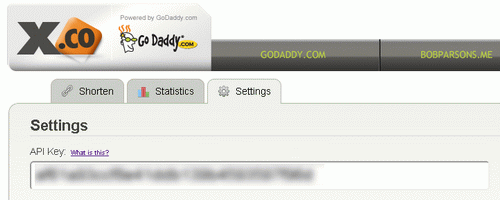
After you complete the registration process, go to http://x.co, login with your username and password, and go to Settings to get your API key. See figure 2.
Figure 2 - X.co API Key
Notice that this is a secret key and you should keep it away from intruder eyes. This key will be used in all of your work with X.co API.
WCF Services
WCF or Web services, not a big deal, let’s just call it WCF. Our service X.co provides you two WCF services that you can access:
The Squeeze service supports only one function that can be used to shorten (squeeze) long URLs. In fact, the Squeeze service provides other functions too, however, they are either deprecated or for the internal use of Go Daddy. The other service, the Reporting service, supports functions related to reports and analytics of short URLs (like clicks and referrer sites.)
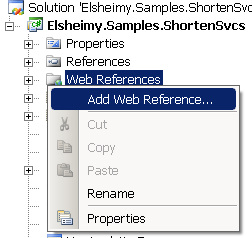
Whatever service you like to use, you must reference it to your projects. To add a reference to a web service to your project, you can use one of two ways. The first and better way is to use Visual Studio. Right-click the Web References node under your project node in Solution Explorer and select Add Web Reference to launch the Add Web Reference dialog (see figure 3.)
Figure 3 - Solution Explorer - Add Web Reference
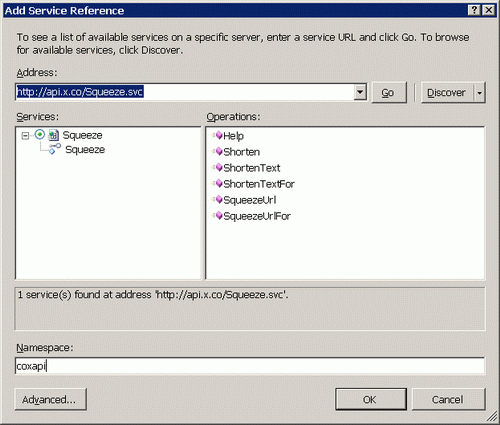
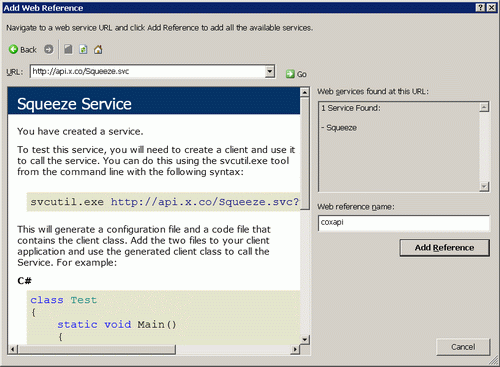
The Add Web Reference dialog is now on the top of the IDE, the dialog might appear different in .NET 2.0 than higher versions (see figure 4 and figure 5.) Whatever, write the address of the service that you need to add, click Go so can Visual Studio read service description, write a good name in the Reference Name field that would be the namespace that groups service objects, and finally click Add Reference. Notice that we have used the name xcoapi for the Squeeze service, and xcoapirpt for the Reporting service.
Figure 4 - Add Web Reference Dialog in .NET 3.0+Figure 5 - Add Web Reference Dialog in .NET 2.0
Another approach to get the required source files for the service is to use the svcutil.exe tool that’s used internally by Visual Studio. This is a command tool that generates source files for web and WCF services. You can use this tool as follows:
Notice that we have included the address of the discovery (description) WSDL data of the services so that the tool can read it. Remember to select your language in the command.
Squeeze Service
The first function we have today and the only function of the Squeeze service (http://api.x.co/Squeeze.svc) is the Shorten() function that’s used to shorten long URL files. This function simply accepts 2 arguments:
url:
The long URL to be shortened.
apiKey:
The API key used to authenticate the call.
There’re other functions existing in the Squeeze service but they are either deprecated or reserved for internal use by Go Daddy.
After you ensure that a reference of the service is added to your project (check the previous section) you can start writing your code. The following function accepts the long URL and returned the shortened one that’s -at the time of this writing- is no more than 16 characters (e.g. http://x.co/8Gg8):
// C#

string Shorten(string url, string apiKey)
{
    using (xcoapi.Squeeze sq = new xcoapi.Squeeze())
    {
        return sq.Shorten(url, apiKey);
    }
}
Notice that web services consumes lots of system resources and you should release them as soon as you finish you work with them, that’s why we have used the C# using statement.
Reporting Service
The other service we have is the Reporting service (http://api.x.co/Reporting.svc) that offers you great deal of analytics and reporting functionalities that can be sorted in 3 areas:
Click count (the number of uses of the short URL)
Referrer sites (for the short URL)
Uses by locations (city, region, and country.)
This service supports 5 functions:
GetTotalMapClick():
Returns total clicks (uses) of a short URLs.
GetMapClicksByDates():
Returns clicks of a short URL made within a given time period grouped by days.
GetMapClicksByHour():
Returns clicks of a short URL made today grouped by hours.
GetMapReferrersByDates():
Returns referrer links made to the short URL within a given time period grouped by days.
GetMapLocationsByDates():
Returns clicks of a short URL made within a given time period grouped by geographic location.
Those five functions are very similar in many ways. First, they all accept two required parameters:
apiKey:
Your API key.
encoded:
The short code of the short URL. For instance, 8Gg8 of http://x.co/8Gg8. Notice that the short (encoded) code is case-sensitive, http://x.co/8Gg8 is very different from http://x.co/8gg8.
In addition, the last four functions work the same way. They all return arrays of objects. GetMapClicksByHour() for instance returns the number of clicks made today grouped by hours each hour is represented by an object that contain the hour number besides the clicks made in that hour, and all objects are grouped inside one array.
The other functions GetMapClicksByDates(), GetMapReferrersByDates(), and GetMapLocationsByDates() work the same way and accept the same parameters except that they accept four additional parameters represent the begin and the end dates of the time period and whether the date parameters were set or leaved empty.
How can the four parameters help? You can define both and set the two flags to indicate that we need a specific time period. You can also set one of them and set its flag to indicate that you need to start from a specific day and get analytics till now. Notice that you can’t leave both empty.
The following code returns the total number of clicks for a specific short URL:
// C#

int GetTotalClicks(string shortCode, string apiKey)
{
    using (xcoapirpt.ReportingClient rpt = new xcoapirpt.ReportingClient())
    {
        return rep.GetTotalMapClick(apiKey, shortCode);
    }
}
And the following code is the same as the above except that it uses .NET 2.0:
// C#

int GetTotalClicks(string shortCode, string apiKey)
{
    using (xcoapirpt.Reporting rpt = new xcoapirpt.Reporting())
    {
        int totalClicks;
        bool succeeded;
        rep.GetTotalMapClick(apiKey, shortCode, out totalClicks, out succeeded);

        return succeeded ? totalClicks : -1;
    }
}
Notice the slight difference between the two calls (in .NET 2.0 and higher versions.) In .NET 2.0, the returned value is specified as an output parameter.
The following code is somewhat complex than the previous. The following code returns the refer links for our short URL:
// C#

xcoapirpt.ReferrerEventInfo[] GetReferrers
    (string shortUrl, string apiKey, out int totalClicks)
{
    using (xcoapirpt.Reporting rep = new xcoapirpt.Reporting())
    {
        xcoapirpt.ReferrerEventInfo[] results =
            rep.GetMapReferrersByDates(apiKey, shortUrl,
                DateTime.Now - new TimeSpan(7, 0, 0, 0, 0), true, DateTime.Now, true);

        totalClicks = 0;
        foreach (xcoapirpt.ReferrerEventInfo r in results)
            totalClicks += r.TotalSpecified ? r.Total : 0;

        return results;
    }
}
Notice how we specify the start and end date parameters and their flags to get only the last week analytics. Notice also the type of the array returned from the function and how we used it to get the required information.
RESTful Services
If you prefer not to use the WCF services, you can start with the REST interface provided to you by the kind-hearted WCF services. A RESTful service is simply a group of related web functions that has specific formats; some of return plaint text, some return XML data, and others return JSON.
Keep in mind that WCF services are supported natively by .NET framework and thus they are faster and easier to work with.
Squeeze Service
Not surprisingly, our RESTful Squeeze service is provided to us by the address http://api.x.co/Squeeze.svc. This service has two functions to shorten URLs, one is JSON, and the other is plain text.
The first function that returns plain text can be called using the following address:
Likewise, the Reporting service has the following address: http://api.x.co/Squeeze.svc. This service provides you with many functions like its WCF counterpart, however, all of them are JSON expect one is plain text. Because JSON is not natively supported by .NET Framework and thus requires the use of other 3rd party components (e.g. Json.NET) we won’t consider those endpoints. However, we have our total clicks function that returns plain text:
هذه المقالة متوفرة أيضا باللغة العربية، اقرأها هنا.
Contents
Contents of this article:
Contents
Introduction
Passing Mechanism
The Two Genres
Value Types
Reference Types
Boxing and Unboxing
Manual Boxing
Manual Unboxing
Automatic Boxing
Automatic Unboxing
Summary
Introduction
Today, we’ll have a brief discussion of value types and reference types in .NET framework and how their behavior change while used or passed to functions. We’ll talk about the passing mechanism, the two genres of .NET types, the scope, and the conversion routines between the two genres.
Passing Mechanism
When you pass an object to a function, this object can be passed either by value or by reference.
To pass an object by value means that a copy of the object is passed to the function not the object itself so changes to the object inside the function won’t affect your original copy.
On the other hand, passing an object by reference means passing that object itself so changes to the object inside that function is reflected on your original copy.
Consider the following example. Although the function changed the value of i, the change didn’t affect the original variable that’s because the variable is passed by value.
// C#

static void Main()
{
    int i = 10;
    int j = i;

    j = 5;

    // you expect '5'
    Console.WriteLine(i);
    // but i is still 10 !!

    // Now you try another way

    Sqr(i);

    // you expect '100'
    Console.WriteLine(i);
    // but i is still 10 !!!
}

static void Sqr(int i)
{
    i *= i;
}
' VB.NET

Sub Main()
    Dim i As Integer = 10
    Dim j As Integer = i

    j = 5

    ' you expect '5'
    Console.WriteLine(i)
    ' but i is still 10 !!!

    ' now you try another way

    Sqr(i)

    ' you expect '100'
    Console.WriteLine(i)
    ' but i is still 10 !!!
End Sub

Sub Sqr(ByVal i As Integer)
    i = i * i
End Sub
Now, let’s try something else. The following example passes i by reference.
// C#

static void Main()
{
    int i = 10;

    Sqr(ref i);

    // you expect '100'
    Console.WriteLine(i);

    // you are right!
}

static void Sqr(ref int i)
{
    i *= i;
}
' VB.NET

Sub Main()
    Dim i As Integer = 10

    Sqr(i)

    ' you expect '100'
    Console.WriteLine(i)

    ' you are right!
End Sub

Sub Sqr(ByRef i As Integer)
    i = i * i
End Sub
Notice how the ref keyword in C# (ByRef in VB.NET) changed the overall behavior. Now, i itself is passed to our function, so the changes made in the function affected the original variable (both are the same.)
The Two Genres
Talking about passing object by value or by reference leads up to talk about the two major genres of types in .NET Framework:
Value Types
Reference Types
Value Types
Value types are those normally passed by value unless you explicitly specify the ref keyword (or ByVal in VB.NET) to override the default behavior and pass the object by reference.
Value types in .NET are those inherit -directly or indirectly- from System.ValueType including all structures, enumerations, and primitives (integers, floats, etc.)
The previous examples use an integer value that’s absolutely a value-type.
Value types are stored on the first section of the memory, the stack. Thus, they are removed from memory as soon as their scope ends. The scope marks the beginning and the end of object’s life (object is considered alive at the time you declare it.) See the following code the marks scopes inside a class.
' VB.NET

Class ClassScope
    ' Scope 1

    Sub Method1()
        ' Scope 1.1
    End Sub

    Sub Method2()
        ' Scope 1.2

        If True Then
            ' Scope 1.2.1

            Do While True
                ' Scope 1.2.1.1
            Loop
        End If
    End Sub
End Class
Reference Types
Reference types are those normally passed by reference and never can be passed by value. Reference types include all objects other than value types, we mean all other classes inherit from System.Object -directly or indirectly- and don’t inherit from System.ValueType.
Reference types are stored in the other version of the memory, the heap, and you can’t determine when the object is removed from memory since the heap is fully managed by the memory manager of .NET, the GC (Garbage Collector.)
Now, let’s see the difference between value types and reference types in action. The following example instantiates two objects, one is a structure (value type) and the other is a class (reference types.) After that, both objects are passed to two functions, both try to change the contents of the objects. The changes of the function affect the reference type outside, while the other value type object outside the function doesn’t get affected.
// C#

static void Main()
{
    ValStruct valObj = new ValStruct();
    RefClass refObj = new RefClass();

    valObj.x = 4;
    valObj.y = 4;
    refObj.x = 4;
    refObj.y = 4;

    MultipleStruct(valObj);
    MultipleClass(refObj);

    Console.WriteLine("Struct:tx = {0},ty = {1}",
        valObj.x, valObj.y);

    Console.WriteLine("Class:tx = {0},ty = {1}",
        refObj.x, refObj.y);

    // Results
    // Struct:  x = 4,  y = 4
    // Class:   x = 8,  y = 8
}

static void MultipleStruct(ValStruct obj)
{
    obj.x *= 2;
    obj.y *= 2;
}

static void MultipleClass(RefClass obj)
{
    obj.x *= 2;
    obj.y *= 2;
}

struct ValStruct
{
    public int x;
    public int y;
}

class RefClass
{
    public int x;
    public int y;
}
' VB.NET

Sub Main()

    Dim valObj As New ValStruct()
    Dim refObj As New RefClass()

    valObj.x = 4
    valObj.y = 4
    refObj.x = 4
    refObj.y = 4

    MultipleStruct(valObj)
    MultipleClass(refObj)

    Console.WriteLine("Struct:tx = {0},ty = {1}", _
            valObj.x, valObj.y)

    Console.WriteLine("Class:tx = {0},ty = {1}", _
            refObj.x, refObj.y)

    ' Results
    ' Struct:  x = 4,  y = 4
    ' Class:   x = 8,  y = 8
End Sub

Sub MultipleStruct(ByVal obj As ValStruct)
    obj.x *= 2
    obj.y *= 2
End Sub

Sub MultipleClass(ByVal obj As RefClass)
    obj.x *= 2
    obj.y *= 2
End Sub

Structure ValStruct
    Public x As Integer
    Public y As Integer
End Structure

Class RefClass
    Public x As Integer
    Public y As Integer
End Class
A little yet very important note: When comparing objects with the double equal signs (or the single sign in VB.NET,) objects are being compared internally using the System.Object.Equals() function. This function returns True if both value objects have the same value or both reference objects refer to the same object (doesn’t matter if both have the same value and are different objects.) Conversely, using the not equals operator (!= in C# and <> in VB.NET) uses the same comparison function, however, it reverses its return value (True becomes False and vice versa.)
Boxing and Unboxing
Boxing is the process of converting a value type into reference type. Unboxing on the other hand is the process of converting that boxed value type to its original state. Boxing and unboxing can be done manually (by you) or automatically (by the runtime.) Let’s see this in action.
Manual Boxing
Consider the following code:
    // C#
    byte num = 25;
    object numObj = num;
    ' VB.NET
    Dim num As Byte = 25
    Dim numObj As Object = num
The last code simply converted a value type (the byte variable) into reference type by encapsulating it into a System.Object variable. Does that really involve that passing the System.Object would be done by reference? Absolutely! (Check it yourself!)
Manual Unboxing
Now you have a boxed byte, how can you retrieve it later, i.e., restore it back to be a value type? Consider the following code:
' VB.NET
Sub Main()
    Dim num As Byte = 25

    'Automatic Boxing
    Foo(num)
End Sub

Sub Foo(ByVal obj As Object)
    Console.WriteLine(obj.GetType)
    Console.WriteLine(obj.ToString)
End Sub
Automatic Unboxing
The runtime can automatically unbox a boxed value:
// C#
static void Main()
{
    // Automatic Boxing
    object num = 25;

    // Automatic Unboxing – not really works
    Foo(num);
}

static void Foo(byte obj)
{
    Console.WriteLine(obj.GetType());
    Console.WriteLine(obj.ToString());
}
' VB.NET
Sub Main()
    ' Automatic Boxing
    Dim num As Object = 25

    ' Automatic Unboxing - works
    Foo(num)
End Sub

Sub Foo(ByVal obj As Byte)
    Console.WriteLine(obj.GetType)
    Console.WriteLine(obj.ToString)
End Sub
The difference between C# and VB.NET in the last situation is that VB.NET allows automatic unboxing while C# doesn’t. (Theoretically, VB.NET allows automatic conversion between the vast majority of types, while C# lacks this feature.)
Summary
That was a brief discussion of value types and reference types in .NET Framework. Value types are those normally when passed to a function or copied, a copy of the value is used not the original value. Therefore, changes made to that copy don’t affect the original object.
On the other hand, reference types are those when passed to a function or copied, the object itself is used. Therefore, any changes made inside the function or to the copy do affect the original object (both are the same.)
Value types in .NET are all types inherit from System.ValueType including structures, enumerations, and primitives. All other classes don’t inherit from System.ValueType are reference types.
Boxing is the process of converting a value type to reference type. Unboxing is retrieving that boxed reference type back. To box a variable simple convert it to System.Object. To unbox it, convert it back to its original type. Boxing could also occur automatically when you pass a value type to a function that accepts System.Object not the type itself.





 Just Like [a] Magic