

Learn how to create, manage, and clean up RabbitMQ queues dynamically with MassTransit — ideal for adaptive, message-driven architectures.
(more…)Tag: .NET

Automating Git Hooks with Husky.Net
Foreword
During a recent encounter with a React project, I noticed how Git hooks were being used to automatically format code and block non-buildable changes from being committed. That sparked an idea—why not apply the same practice in .NET projects? My search for a solution led me to Husky.Net, a powerful tool designed to automate Git tasks seamlessly within .NET environments.
(more…)
Challenges in Migrating ASP.NET Apps to Containers #3 – OpenSSL Issues
Introduction
During a recent project, there was a requirement to migrate existing ASP.NET apps hosted on Windows to Linux Docker containers. Throughout this migration, numerous challenges arose, and a significant amount of time was dedicated to the migration process. In this post, as well as in subsequent posts with similar titles, I will briefly outline some of the key challenges that were encountered. One of those challenges was OpenSSL Legacy Renegotiation.
(more…)
Challenges in Migrating ASP.NET Apps to Containers #2 – Windows Fonts
Introduction
During a recent project, there was a requirement to migrate existing ASP.NET apps hosted on Windows to Linux Docker containers. Throughout this migration, numerous challenges arose, and a significant amount of time was dedicated to the migration process. In this post, as well as in subsequent posts with similar titles, I will outline briefly some of the key challenges that were encountered. One of those challenges was Windows Fonts, which this post is dedicated to.
(more…)
Challenges in Migrating ASP.NET Apps to Containers #1 – Multiple Active Result Sets
During a recent project, there was a requirement to migrate existing ASP.NET apps hosted on Windows to Linux Docker containers. Throughout this migration, numerous challenges arose, and a significant amount of time was dedicated to the migration process. In this post, as well as in subsequent posts with similar titles, I will outline briefly some of the key challenges that were encountered. To begin, I will address the challenge with the longest battle: multiple active result sets!
(more…)Reducing Complexity using Entity Framework Core Owned Types
I came across a very nice feature of Entity Framework Core that I would like to share with you, it is the owned types.
EF Core’s owned types allow you to group fields, that you do not want to appear as a reference, in a separate type.
(more…)
Handling ‘mailto’ and ‘tel’ Links inside Android WebView
Overview
Previously we created wrappers around mailto and tel HTML links. Today we will see how to integrate those wrappers into our Android app to respond to user clicking mailto and tel links.
(more…)Unix Time to System.DateTime and Vice Versa
Overview
This code demonstrates how to convert between Unix time (Epoch time) and System.DateTime. This code was previously mentioned in my Protrack API post.
(more…)
Accessing Protrack API (an Object-Oriented Approach)
Overview
Protrack is one of the well-known web-based GPS tracking software and today we will learn how to access its API using C# and .NET Framework. We will create a little wrapper around the API and use it to track GPS devices in a target account. This lesson will show you some of object-oriented concepts in action.
(more…)Using Video Markers in Silverlight
Definition
Markers are text annotations embedded at certain points in a media file. They help you in several cases. For example, you might use markers to set captions or subtitles for a video file, or maybe you use it to identify particular points in a media file so you can play the media starting at particular points.
Marker Support
Silverlight has native support for video markers, you can subscribe to the MarkerReached event of MediaElement control to get notified whenever you reach a marker. However, in order to use video markers you need to encode them in the video file. The best application that you can use to encode markers in a video file for Silverlight is Microsoft Expression Encoder.
Marker Encoding
After you have your video file added to Expression Encoder, you can use the timeline to set the markers at the desired locations. You can add a marker by moving to the position where you want to set the marker at, then right-clicking the timeline and selecting Add Marker to add a new marker.
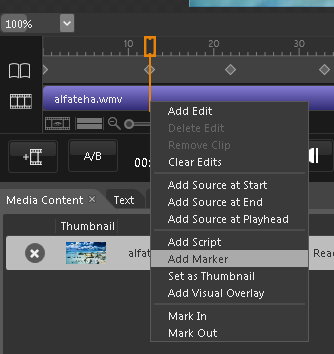
You then go to the Markers window where you can set marker text (value) and manage existing markers.
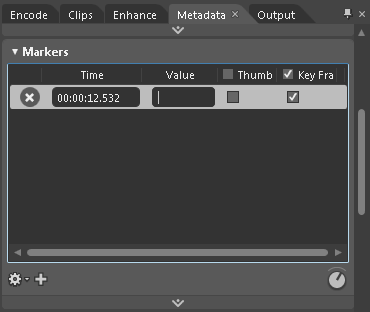
Notice that every marker is identified on the timeline by a symbol like diamond (♦). You can change marker position by moving this symbol, and you can remove it by right-clicking it and choosing Remove (you can also use the Markers window.)
Now encode the video and prepare it to be used in Silverlight.
Code
After you have created your MediaElement and prepared it with the video, you can then subscribe to the MarkerReached event and handle the marker when the video reaches it. An example of handling markers is to display the marker text on the screen if, for example, it is a caption/subtitle for the video:
void theMedia_MarkerReached(object sender, TimelineMarkerRoutedEventArgs e)
{
    theTextBlock.Text = e.Marker.Text;
}
And you can also load the markers to a list box (for example) and let the user moves to the position of the markers he chooses (worth mentioning that markers are only available after MediaOpened event is raised):
void theList_SelectionChanged(object sender, SelectionChangedEventArgs e)
{
    if (this.theList.SelectedIndex > -1)
        theMedia.Position = theMedia.Markers[theList.SelectedIndex].Time;
}
Makes sense?
 Just Like [a] Magic